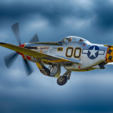
AverageModeler Posted August 6, 2020 Share Posted August 6, 2020 Here are a few recent completions using my Cameo4. Eduard's rebox of Hasegwa 1/72 B-26. All marking done on Cameo except for nose art. Eduard's 1/48th P-51D as June Nite. 12 1 Quote Link to comment Share on other sites More sharing options...
Kevin Futter Posted August 6, 2020 Share Posted August 6, 2020 Nothing average about those! Kev 1 Quote Link to comment Share on other sites More sharing options...
Mozart Posted August 28, 2020 Share Posted August 28, 2020 The black and white image of the Mustang is superb, really love that! Quote Link to comment Share on other sites More sharing options...
AlbertD Posted October 24, 2020 Share Posted October 24, 2020 It's beautiful work like this that convinced me I need a Cameo machine. That Mustang is gorgeous. 1 Quote Link to comment Share on other sites More sharing options...
Mozart Posted October 24, 2020 Share Posted October 24, 2020 8 hours ago, AlbertD said: It's beautiful work like this that convinced me I need a Cameo machine. That Mustang is gorgeous. Good to see you here Albert, you won't regret going down the Cameo route, it's the best modelling decision I ever made, and for more reasons other than just markings. 1 Quote Link to comment Share on other sites More sharing options...
AlbertD Posted October 25, 2020 Share Posted October 25, 2020 11 hours ago, Mozart said: Good to see you here Albert, you won't regret going down the Cameo route, it's the best modelling decision I ever made, and for more reasons other than just markings. Thank you. Seeing you guys paint on the great markings pushed me over the edge and want one. Builds like the above Mustang just look so much better than decals. I have used store bought a couple of times but it can be hard to fund just what you need. It will be nice to be able to just cut a new mask when one gets messed up too. I hope I can eventually contribute to the library on here. 2 Quote Link to comment Share on other sites More sharing options...
MikeC Posted September 9, 2021 Share Posted September 9, 2021 Nicely done, in particular a superb Pony. Quote Link to comment Share on other sites More sharing options...

Recommended Posts
Join the conversation
You can post now and register later. If you have an account, sign in now to post with your account.
Note: Your post will require moderator approval before it will be visible.