

Kevin Futter
Administrators
-
Joined
-
Last visited
Everything posted by Kevin Futter
-
 Encouraging results, Guy! Kev
 -
I'd venture to say that this is still much better than any of the blade cutters could manage! Kev
-
-
It will eventually - probably later this year. But it should also come with the same options for changing your preferences. Kev
-
Let's hope they keep supporting it, as it seems they have a strong preference for the new style! I don't mind it personally, but I do appreciate its drawbacks. Kev
-
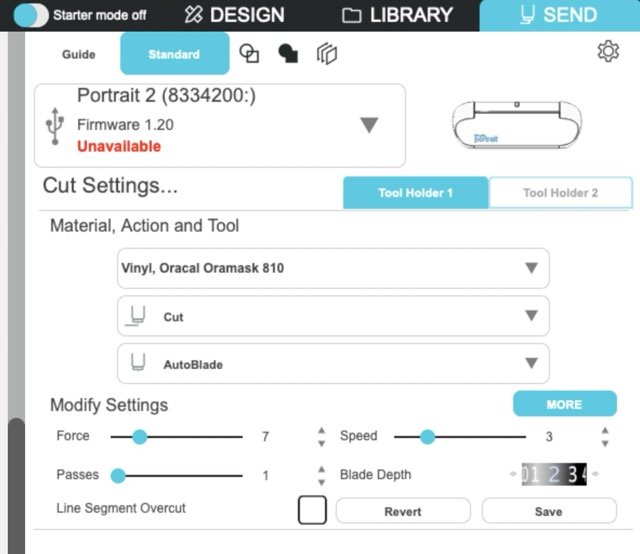
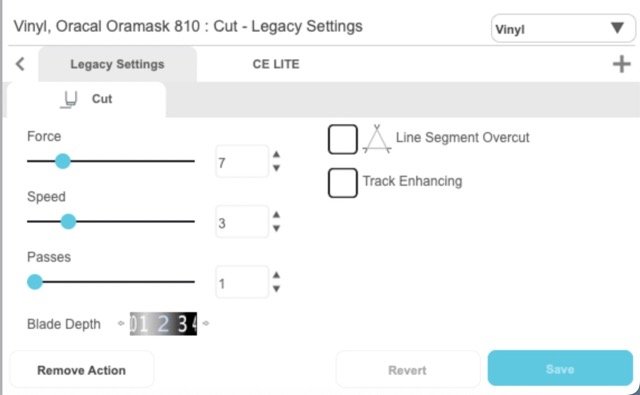
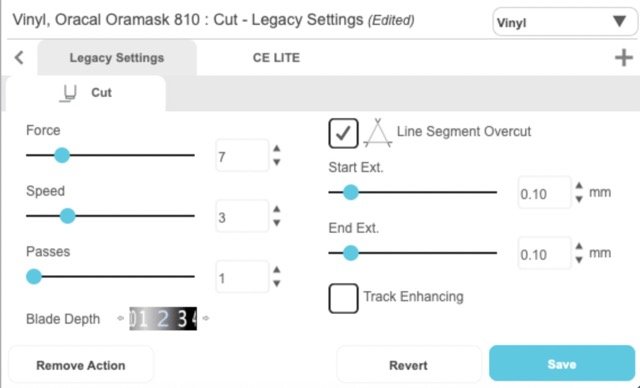
It's come to my attention that the interface for these settings is quite different in the latest versions of the Silhouette Studio software. I'm using v5 of the software (5.0.219ssbe Business Edition), and I found them by going to the SEND area, then clicking on the MORE button in the Modify Settings area: This opens up a long list of material types, but there's a settings panel at the bottom, which contains the settings in question: And a couple of parameters you can adjusted when selected: Kev
-
Progress is progress, Guy! Good to see you getting somewhere with it. Kev
-
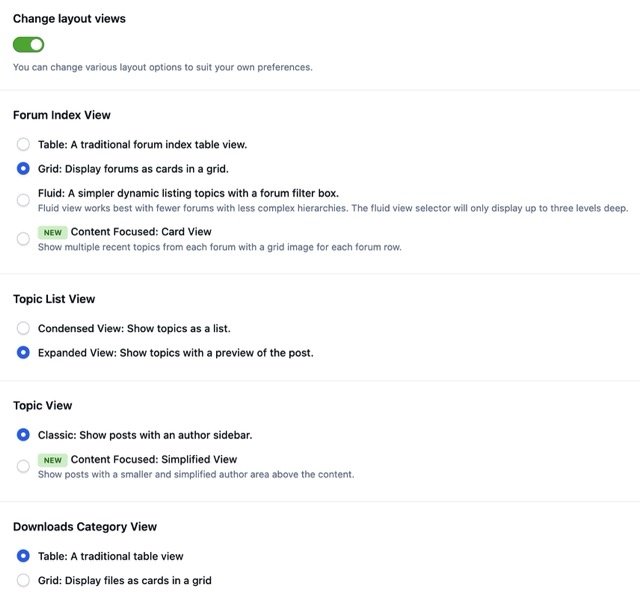
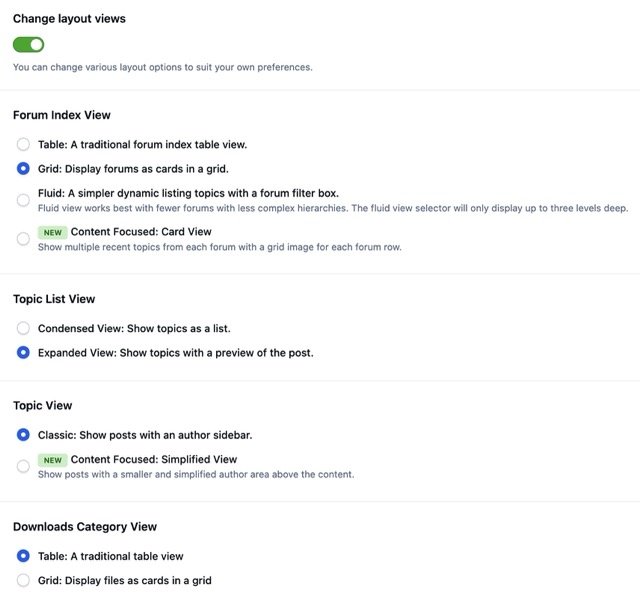
With the new v5 of the forum software comes a new interface, which is radically different from the previous one, and takes some getting used to. It's also not everyone's preference, so if you prefer the old style view, you can change this in your profile settings. Here's how: Firstly, edit your profile by choosing the "Edit Profile" option from the drop-down menu you get when you click on your forum name at the top right of the screen: Then choose the "Content Preferences" option at the bottom of the list of settings on the left: Enable the "Change layout views" setting, which will then reveal all the options and settings you have for viewing the forums: Kev


-
This is actually a user-controllable setting now. Edit your profile from the menu at the top right of the page, and then select "Content Preferences". This will give you something like this: Enable the "Change layout views" option at the bottom, and you'll be able to select how you view the forums: Kev

-
This handy article on the 3DCuts website discusses a feature introduced in v3 of the Silhouette Studio software that helps make sharp corner cuts better: https://3dcuts.com/silhouette-line-segment-overcut-tutorial Thanks for Leon over at LSP for posting the link! Kev
-
Just ran another minor software update, so consider this a testing post to make sure everything still works! Kev
-
-
Welcome aboard, Michael! 👋 Kev
-
That's a shame, Guy. I hope you can get it resolved without too much mucking around. Kev
-
It looks like Imgur doesn't want to give you access to the proper image link, which is a bit annoying. The easiest way to get at it is to right-click on the image (assuming you're using a desktop browser and not a mobile device), and choose your browser's version of "copy image link". Then paste that link into the post edit window here. This should give you something like so: Very nice build, by the way! Kev
-
Thanks, Harry. I think it makes it easier for a wider audience to understand your descriptions, and as an English-language site, I think it makes sense. Kev
-
Thanks for this upload, Harry. Any chance of providing your descriptions in English? Kev
-
Welcome aboard, Jamie! Kev
-
Welcome aboard, Chuck! Great to have you here. Kev
-
Fascinating, Guy! I've always wondered if these consumer-level units were any good. Looking forward to your report! Kev
-
I tend to just stick with Silhouette Studio, which is pretty clunky, but also enormously capable—especially if you pay the small upgrade fee to the Business Edition. Of course, this assumes you're in the Silhouette universe, rather than Cricut, Brother, or some other alternative. Another option is Affinity Designer, which is a highly cost-effective alternative to Adobe Illustrator. Kev
-
Welcome aboard, Davy! 🫡 I get around, so I'm known in many places! Kev
-
If you're reading this, then I'm sure you will have noticed that I've started to customise some of the forum "header card" images that now adorn each section of the forums. Let me know what you think! I've mainly used images of my own models, just to avoid any copyright issues with "found" images. There are few for which I haven't been able to come up with anything, however, so I'd welcome any suggestions or contributions. We could feasibly swap them out on an occasional or even regular basis, though I suspect that may dilute their usefulness as a recognition tool. Kev
-
I started this build back in 2020, and then it got stalled by whole bunch of major life changes. I resumed it again last year, and was able to finally finish it this year. It's the Revell boxing of the old Matchbox 1/32 Tiger Moth kit, combined with the 1/32 air ambulance conversion set from Uncle Les. This consisted of some resin spine pieces and a vacform windscreen/canopy, along with some home-printed decals. I used the decals as the basis for creating my own paint masks on the Silhouette Portrait, and here is the result! And its final resting place: This is the first aircraft model I've rigged since I was a kid, and I'm not particularly happy with my process, or the results it produced, but I'm certainly glad to have finished it! Full build thread can be found on LSP: https://forum.largescaleplanes.com/index.php?/topic/86475-matchbox-tiger-moth-raaf-air-ambulance/ Kev
-
I would! They may spin you some BS, but if the machine doesn't cost much, it may also be worth the gamble. Kev