Mozart
SMPM_Members
-
Joined
-
Last visited
Everything posted by Mozart
-
 It seems to be the trend these days that we are increasingly being told “what’s best for us” by those who deem themselves to have the power, I have a particular beef with some of the settings on my iphone for instance. Really pisses me off. So I hope a) that I am allowed to stick with this setting, and b) that the LSP format doesn’t change like this one has!
 -
Thanks for that Kev. I have to say that I don’t like the boxy- grid format at all, find it most off-putting, so I’m much happier now that I have reverted to the “classic” format. Max
-
Good to see a new member, and somebody who has recognised the immense value and potential in making your own masks. I hope you find something of value here Michael, though I’m afraid as a Silhouette user my knowledge of Cricut is zero! ☹️😃 Max
-
Hello Jamie, and welcome. Buying your wife a Cricut is the way to go, “my” Silhouette machine was a present for my wife 11 years ago, bought to help her card making hobby. She still doesn’t know how to use it!
-
Hello Davy, welcome to the world of mask making! If you don’t find an answer here to any questions, just ask. Max
-
Works fine for me Kev, well done, and please don’t retire! 😂 Max
-
Definitely the way to go for small stuff Guy, is a laser cutter available at a reasonable price? I must admit I have no knowledge whatsoever about them; availability, cost, ease of use, material to be cut, machine size etc etc. I’ll be interested to know what you know or have researched. Max
-
Indeed a superb Spitfire in all its detail and authenticity. If I may add a little to Guy’s post? He asked me about the “do not walk” markings over the wing bulges, even in 1/24 scale these were going to be a challenge for the Silhouette cutter, so I prepared a range based on Guy’s estimates and measurements of the length of the dashed markings: I had to fiddle the length of the dashed lines for the optimum effect, the letters from memory are 1.5mm tall. The “B” inevitably was the least successful, but overall a good result: Max
-
Good to see you here John, I’m sure you’ll soon discover the benefits of your cutting machine, though being a Silhouette user I can’t offer any specific advice on the Cricut. Max
-
Cricut transfer sheet every time.
-
Welcome Benjamin. Tips and tricks…..hmmm, there are so many that I have learned over the years. I like to make life as simple and straightforward as possible so I give each task a lot of thought before I start to determine the most efficient way of working, and one of the most useful tools is the “OBJECT”, “MIRROR” tool on the top bar where you can flip sections of your drawing to build up the final design. Max
-
Welcome Francois, especially to a rugby fan! Masks for 1/72, wow…..very tricky for anything other than main markings I think, not even serial numbers! Bon chance. 😁
-
I know it’s an enlarged picture but your transfer sheet looks a bit odd, and to be honest I have never had much success with Frisket. My go-to is Cricut transfer film, very clear for accurate stencil positioning but firm enough to hold the stencil. Worth a try? Max
-
I have been working with Peter Castle of Airscale fame to produce masks for his new and ground-breaking venture, a fully 3D printed, highly detailed and accurate 1/32 kit of the Boulton Paul Defiant. His kit, due for release in the near future, has markings for a day and night fighter variant. The kit will feature decals for those who like to go down that route, but paint masks will be available from Peter for a small extra cost in “hard copy” form and also here as a downloadable file on this site. The kit’s box will have a QR code on it which will link directly to these files. Max
-
View File Airscale Pro BP Defiant Mk I nightfighter Marking and squadron code masks for the new Airscale Pro Boulton Paul Defiant Mk I nightfighter. Submitter Mozart Submitted 03/13/2025 Category Aircraft - Military
-
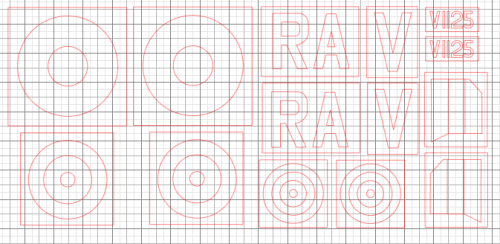 Marking and squadron code masks for the new Airscale Pro Boulton Paul Defiant Mk I nightfighter.
 -
-
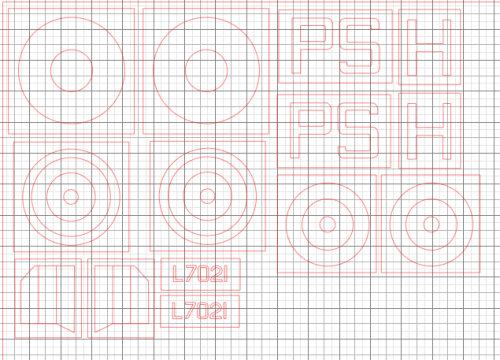 Marking and squadron code masks for the new Airscale Pro Boulton Paul Defiant Mk I day fighter.
 -
Hello John, hope you enjoy your time here and that you find the forum productive. Max
-
Good to see you here Bogdan, a Silhouette cutter will prove to be so useful for you! Good luck.
-
View File Kotare Spitfire 1 (mid) Masks for the Kotare Spitfire, these are particularly for a 41 Squadron aircraft which operated over the Dunkirk beaches in early June 1940. Submitter Mozart Submitted 01/03/2025 Category Aircraft - Military
-
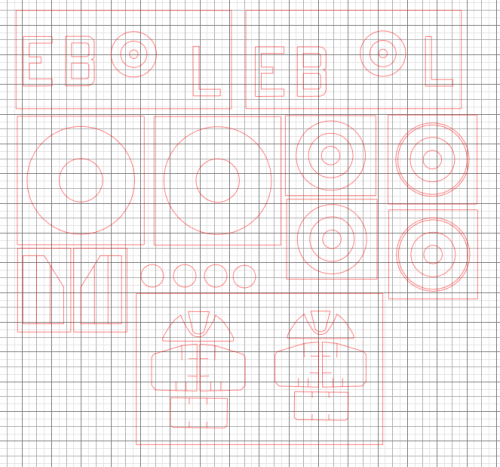 Masks for the Kotare Spitfire, these are particularly for a 41 Squadron aircraft which operated over the Dunkirk beaches in early June 1940.
 -
Welcome Mark. I know nothing about Cricut machines but I hope you find plenty here of use.
-
Morning Duncan…..funnily enough I’ve been replying to your thread on colours over on BM! Hope all’s going well with your venture into masks, plenty of advice and examples here for you to find out about masking. Max
-
Hello Carl, it’s great to see you here, especially as a Silhouette owner! Please feel free to share some of your work and any tips that you may have. The more the merrier! Max