
Kevin Futter
-
Posts
369 -
Joined
-
Last visited
-
Days Won
94
Content Type
Profiles
Forums
Events
Downloads
Everything posted by Kevin Futter
-
I've now set up the Works in Progress forum, and moved this thread into it as the very first entry! I'll let you guys read all about it in the Rules of the Road post. Kev
-
Welcome to the Scale Model Paint Masks Works in Progress forum! Here you can post the progress of builds you're working on that you will be using paint masks on. You can post the entire build from start to finish, or just focus on those sequences that involve the masking and painting process. Either way, the point is to showcase your work, and help people see how it's done. Have fun! Kev
-
I'll definitely go ahead with it, I just need to find the time to set it up! Hopefully this week. Kev
-
Terrific result, Mike! Looking forward to your glamour shots. Kev
-
Thanks for posting this here, Woody! Very useful tutorial. Kev
-
Lovely work, Mike! Looks terrific. Kev
-
Welcome aboard, Gary! Great to have you here. Kev
-
Welcome aboard! I'd heartily recommend the Silhouette range over the Cricut models, just on the basis that the latter require you to use web-based software to run, and limit your projects to 20 per month. Kev
-
I think the idea of allowing members to contribute a full build thread is a good one, even if most members don't. I'm keen to keep this forum pretty focussed on its niche, and not become Yet Another Modelling Forum. But if broadening the content broadens the membership and helps keep the site viable, then I'm all for it. I'll try to get something set up during the week. Kev
-
I like this idea Max, and will ponder it some more. I need to decide whether we go for a full-blown build forum pertaining to the use of paint masks, or try to place artificial limits on which portions of the build can be shown (i.e., only the masking and painting sequences). Thoughts? I'm leaning towards the former, personally. Kev
-
No problem at all, Mike. It's just housekeeping. I've deleted to second file and thread, so hopefully no more confusion! Kev
-
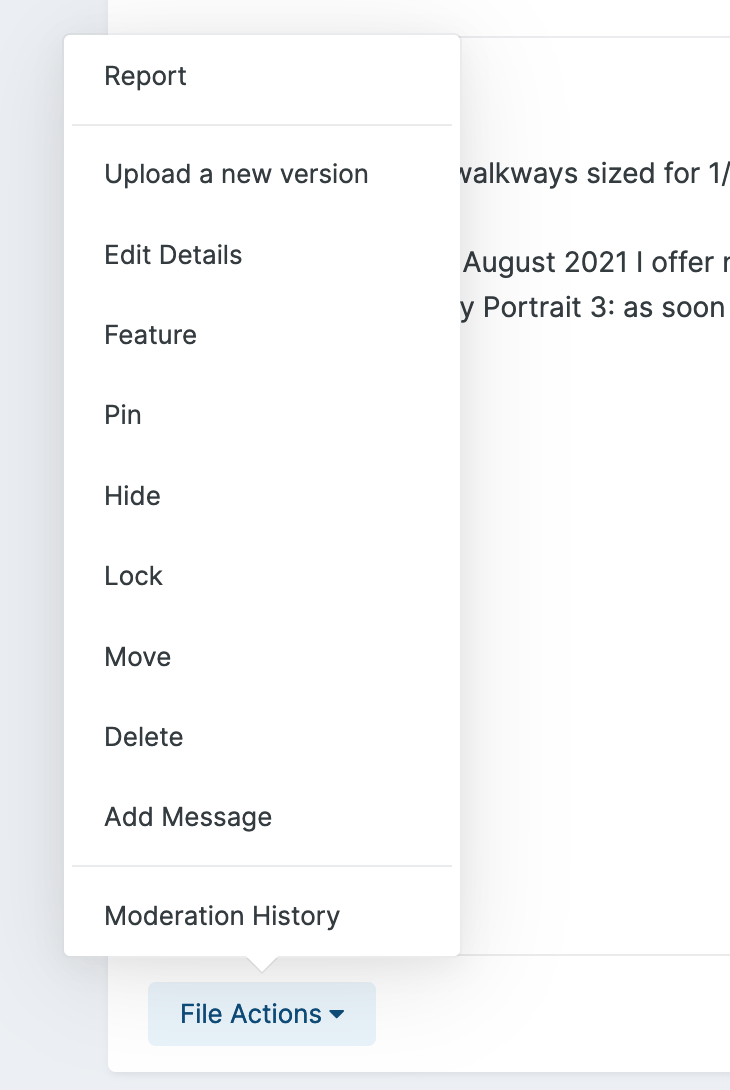
On the original upload, there's a "File Actions" pop-up menu link that gives you the following options: The second one from the top is "Upload a new version". That's it! Kev

-
Excellent outcome, Mike! When I get the time, I intend to create a section in the forums that collates all the online documentation and tutorials I can find, so that we have a bit of a one-stop-shop for troubleshooting. Kev
-
Sounds like a very strange and frustrating problem, Mike. I wish you luck with it, and hope you can get it resolved soon. I wish I could be of some help! Kev
-
Welcome aboard, Winnie! Yes, mask cutting is indeed a niche, but a valuable one, and one that more modellers will start to experiment over time, I think. It's a shame that the cutting machines remain relatively expensive, but an entry-level unit like the Silhouette Portrait doesn't really cost much more than a decent airbrush or compressor. Kev
-
Terrific work, Gaz! Kev
-
Let me think about this one. Topics such as what you guys are suggesting tend to be time-sensitive, and posts can go stale pretty quickly. I think perhaps broadening the idea to a general Reviews section might work better; that way, members can post reviews of whatever they feel is relevant: hardware, software, consumables, suppliers, etc. Kev
-

Asking for advice on which cutter to buy
Kevin Futter replied to bushande's topic in Hardware & Software
Excellent choice in my opinion, Mike. I wish you luck with it, and hope that it fulfils both your expectations and your needs. Kev -
I honestly don't think that arrangement is ideal, Mike. Bluetooth has a very limited range (estimates seem to vary, but 10m is commonly given), and generally doesn't penetrate obstacles as well as radio waves or wi-fi, for example. It might work, but given Dave's account of his flaky Bluetooth experience, I reckon you'd be better off sticking with USB if you can. I certainly know what it's like to not have any room though, as a lack of it was the primary reason I chose the Portrait over the Cameo. Kev
-
Asking for advice on which cutter to buy
Kevin Futter replied to bushande's topic in Hardware & Software
Awesome! Good luck with it. I've just amended your post so it shows the image inline (your link was using bbCode, which the forum software no longer supports). Kev -
I only have a Portrait 2, and I don't believe it has Bluetooth. I'm using it via USB, which works well enough. I'm not sure if the Portrait 3 has Bluetooth as standard, but if it does, it's probably your best choice for the combination of convenient footprint and connectivity options. That said, if you'll be siting the device somewhere where there's room for the larger Cameo, then perhaps that device's extended performance and features will be more attractive, especially given that Bluetooth takes away the need for it to be within cable's reach of your computer. The big difference with the Cricut, as I understand it, is that it doesn't come with any software that you run on your computer. Rather, you have to use their cloud-based software and services to run the device. And they recently made some changes to that functionality that limits the way you can use it - I can't remember exactly what they were now, but I've posted about it elsewhere in the forums. In short, I'd stick with the Silhouette product over the Cricut range. Kev
-
Excellent! Thanks, Mike. Kev
-
OK folks, as far as I can tell, we're live on the new server now. I managed to get the two confused and make this post on the old one, so my guess is that some of you may have seen an earlier version of this update post, and then watched it disappear later. DNS propagation can be a bit of a nightmare when you're moving a site, and there's really no easy way to tell which version you're looking at, unless you switch the old one off completely. Anyway, chime in if you're seeing this! Kev
-
Hi everyone, I'm in the process of migrating Scale Model Paint Masks to a new server. This will necessitate a little bit of downtime, which I hope to keep to a minimum. I'll switch the forums to maintenance mode on the old server when I'm ready to switch, and enable them on the new server. If you're still seeing the forums as being offline, then you'll know you're still connecting to the old server, not the new one. Once the new DNS settings have propagated, you should be fine - though this might require you to restart your browser, and possibly even clear your caches. I won't post any more updates here about this, as it'll be kind of pointless, so keep an eye on the KLP Facebook page for further news. I'll also post an update here once the transfer is complete. See you on the other side! Kev
-
Asking for advice on which cutter to buy
Kevin Futter replied to bushande's topic in Hardware & Software
Welcome aboard, sir! It's ironic that even though I run the site, I'm no expert at mask cutting myself! That's partly why I created the site, I guess. That said, I personally use a Silhouette Portrait, and find it fine for my needs. I don't think the Cameo is capable of cutting any finer or smaller, but rather, it can handle larger material sizes, and a wider variety of them I believe. I don't have any additional blades or cutting mats, and just use the supplied free version of the Silhouette Studio software. I went with the Portrait partly because it was cheaper, partly because it has a much smaller footprint, and partly because reviews suggested it was perfectly fine for my needs when compared with the Cameo. So, the Portrait would be my suggestion! Kev