

MikeC
-
Posts
161 -
Joined
-
Last visited
-
Days Won
51
Content Type
Profiles
Forums
Events
Downloads
Everything posted by MikeC
-
Just as a quick update on this model, it's now left my collection, and has a new home in the Bentwaters Cold War Museum. This is a small but excellent museum, run by what is clearly an enthusiastic and committed bunch of volunteers, who include a number of modellers who are also part of the local IPMS branch. Thoroughly recommended if you're ever in that part of England.
-
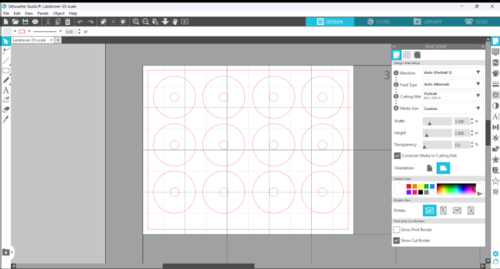
View File Landrover-35-scale.studio3 In a rare departure for me, I'm doing a 1/35 scale Landrover Series 3: it's a slightly out-of-scale accessory to go with a 1/32 scale aeroplane, of course. This set of wheel masks assumes that, like me, you paint the wheel centre, then mask that and paint the tyre. There are masks for five wheels (four plus the spare on the bonnet) and a spare pair. The central circle is to allow for mounting on a cocktail stick for painting. Sized for the Italeri 1/35 scale kit (kit no 6508, Landrover Series 3, LWB). It is equally applicable to civilian vehicles, or course, but as I'm doing a military one it's in here. Feedback welcome. Submitter MikeC Submitted 03/14/2024 Category Vehicles - AFVs & Military
-
Version 1.0.0
0 downloads
In a rare departure for me, I'm doing a 1/35 scale Landrover Series 3: it's a slightly out-of-scale accessory to go with a 1/32 scale aeroplane, of course. This set assumes that, like me, you paint the wheel centre, then mask that and paint the tyre. There are masks for five wheels (four plus the spare on the bonnet) and a spare pair. The central circle is to allow for mounting on a cocktail stick for painting. Sized for the Italeri 1/35 scale kit (kit no 6508, Landrover Series 3, LWB). It is equally applicable to civilian vehicles, or course, but as I'm doing a military one it's in here. Feedback welcome. -
Bonjour Denis, bienvenue.
-
Bonjour Laurent, et bienvenue.
-
Thanks: must give that a try sometime.
-
Hi Butch, And what an introduction! That's impressive work.
-
Version 1.0.0
0 downloads
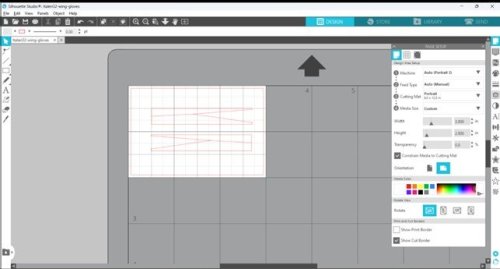
The 1/32 scale Italeri Tornado kits (at time of submission IDS, ECR and GR4 boxings) have a wing glove in a vinyl-like material to protect the slot the wings sweep back into. It occurred to me while building my GR4 that this would need masking for painting, so I knocked up these masks. The top one is for part 4J (port), under that 3J (starboard). NB: I have tested these against the wing glove parts, but have not tested them yet on the assembled model. When I have I'll update them if need be. -
View File Italeri32-wing-gloves.studio3 The 1/32 scale Italeri Tornado kits (at time of submission IDS, ECR and GR4 boxings) have a wing glove in a vinyl-like material to protect the slot the wings sweep back into. It occurred to me while building my GR4 that this would need masking for painting, so I knocked up these masks. The top one is for part 4J (port), under that 3J (starboard). NB: I have tested these against the wing glove parts, but have not tested them yet on the assembled model. When I have I'll update them if need be. Submitter MikeC Submitted 12/22/2023 Category Specific Aircraft
-
Hi PhilJ, and Are you the PhilJ I think you may be, as in a member of Avon?
-
And here's another one from LSP - hi and
-
Hi Phil,
-
Version 1.0.0
57 downloads
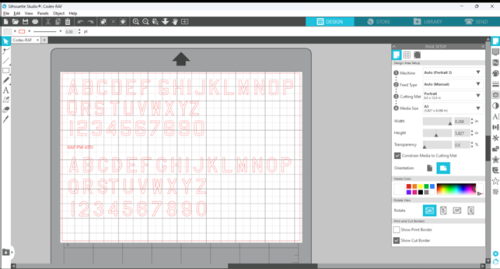
I saw a thread on LSP recently, in which the OP described the difficulties with installing certain fonts, which are recognised by MS WOrd and other software, but not picked up by the Silhouette Studio software. The process the poster described was basically the one I used: Type up the lettering you want in MS Word, scan it in, and manipulate it until you have your codes in your studio 3 file. What a bother! But there is no way round it. However, the thread reminded me that I had created this file, but not uploaded it here. SO better late than never, here it is. It contains all the letters and numerals in two of the most common font styles used by RAF aircraft. You can use them for squadron codes, serial numbers, or whatever you choose. Just copy and past the characters you require into your own Studio 3 file, size them and arrange them to suit your subject, and off you go. Applicable to all scales - although the smallest I've managed to cut are the 4" characters that the RN use for serials in 1/32 scale. Hope this is useful. -
View File Codes-RAF I saw a thread on LSP recently, in which the OP described the difficulties with installing certain fonts, which are recognised by MS Word and other software, but not picked up by the Silhouette Studio software. The process the poster described was basically the one I used: Type up the lettering you want in MS Word, scan it in, and manipulate it until you have your codes in your studio 3 file. What a bother! But there is no way round it. However, the thread reminded me that I had created this file, but not uploaded it here. So better late than never, here it is. It contains all the letters and numerals in two of the most common font styles used by RAF aircraft. You can use them for squadron codes, serial numbers, or whatever you choose. Just copy and paste the characters you require into your own Studio 3 file, size them and arrange them to suit your subject, and off you go. Applicable to all scales - although the smallest I've managed to cut are the 4" characters that the RN use for serials in 1/32 scale. Hope this is useful. Submitter MikeC Submitted 11/24/2023 Category Aircraft - Military
-
Hi Rick, Wilkommen.
-
Interesting discussion going on over at LSP https://forum.largescaleplanes.com/index.php?/topic/97944-oramask-810-gone-bad-update/#comment-1425663
- 1 reply
-
- 2
-

-
Hi there, and
-
Hi there, welcome aboard.
-

Greetings from Grand Haven, Michigan, United States
MikeC replied to Mdriesenga's topic in Introductions
Hi there, and -
Just as a final wrap-up to this thread, the model "went home" yesterday, and now resides in the Fowlmere Airfields Museum. Many thanks to Mark and the team for giving my efforts some display room. https://forum.largescaleplanes.com/index.php?/topic/90601-p-51d-5na-339th-fg-finished/&do=findComment&comment=1420654
-
Hi Benoit, welcome aboard.
-
I'm old and retired too, however my brain tells me I'm still 25. My body, on the other hand, says "You wish!!" Welcome aboard.
-
It is that. Mine does everything I needed it to.
-
Howdy, welcome aboard. As Max says, you need a machine, although before I got mine I tried a couple of commercial masks, plus one done for me by a pal in my IPMS branch, to make sure I was comfortable with the process.