Jump to content
View in the app

A better way to browse. Learn more.

Scale Model Paint Masks

A full-screen app on your home screen with push notifications, badges and more.

To install this app on iOS and iPadOS
  1. Tap the Share icon in Safari
  2. Scroll the menu and tap Add to Home Screen.
  3. Tap Add in the top-right corner.
To install this app on Android
  1. Tap the 3-dot menu (⋮) in the top-right corner of the browser.
  2. Tap Add to Home screen or Install app.
  3. Confirm by tapping Install.
  • Search By Tags

    Search will match any tag entered
  • Search By Author

Content Type

Forums

  • News & Information
    • Site Info
    • Introductions
    • General Discussion
  • Scale Model Paint Masks
    • Aircraft - Military
    • Aircraft - Civil
    • Vehicles - AFVs & Military
    • Vehicles - Civil
    • Boats & Ships
    • Sci-Fi & Real Space
    • Canopy Masks
    • Non-Mask Applications
  • SMPM Discussion
    • Q & A
    • Hardware & Software
    • Tutorials
  • Models
    • Works in Progress
    • Gallery

Calendars

  • Community Calendar

Categories

  • Aircraft
    • Aircraft - Military
    • Aircraft - Civil
    • Canopy Masks
  • Vehicles
    • Vehicles - AFVs & Military
    • Vehicles - Civil
  • Boats & Ships
  • Sci-Fi & Real Space
  • Non-Mask Cutting Files

Find results in

Find results that contain...

Date Created

  • Start

    End

Last Updated

  • Start

    End


Filter by number of...

  • Minimum number of comments

  • Minimum number of replies

  • Minimum number of reviews

  • Minimum number of views

Found 3 results

    • 0 downloads
    • Version 1.0.0
    Canopy masks for the new tool Airfix Blackburn Buccaneer. Apply the first set of canopy masks before painting the light colored canopy seals. Then apply the second masks over those before painting the aircraft camouflage. The small circle is for the landing light on the nose landing gear.
    • 6 downloads
    • Version 1.0.0
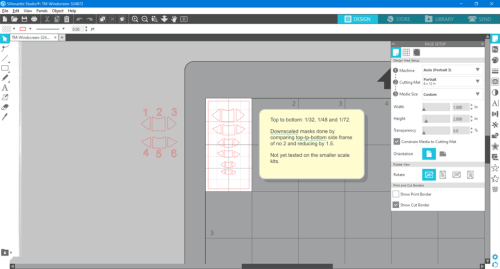
    I've been working on a pair of ICM Tiger Moths, and in common with many ICM kits, there is a mask template in the instructions which was easily used to produce these masks. I thought that as we have recent kits of this from Airfix in both 1/48 and 1/72, I'd include these by downscaling the 1/32 masks as detailed in a note on the file. There is also a separate set of drawings off the cutting area: these are there as an indicator of which mask is which, they correspond to the ICM instructions, thus they are not guaranteed to be the same size as the final masks on the cutting area. I am in the process of masking up the ICM windscreens, and the fit is OK so far. I have not yet tried the smaller masks on a kit. I have a pair of 48th examples in the stash, and will update the file if necessary when I've built them. If you try the smaller-scale masks, please PM me with any feedback, particularly if the sizes are significantly incorrect. Thank you.
  1. View File TM-Windscreen-324872.studio3 I've been working on a pair of ICM Tiger Moths, and in common with many ICM kits, there is a mask template in the instructions which was easily used to produce these masks. I thought that as we have recent kits of this from Airfix in both 1/48 and 1/72, I'd include these by downscaling the 1/32 masks as detailed in a note on the file. There is also a separate set of drawings off the cutting area: these are there as an indicator of which mask is which, they correspond to the ICM instructions, thus they are not guaranteed to be the same size as the final masks on the cutting area. I am in the process of masking up the ICM windscreens, and the fit is OK so far. I have not yet tried the smaller masks on a kit. I have a pair of 48th examples in the stash, and will update the file if necessary when I've built them. If you try the smaller-scale masks, please PM me with any feedback, particularly if the sizes are significantly incorrect. Thank you. Submitter MikeC Submitted 10/23/2022 Category Canopy Masks  

Configure browser push notifications

Chrome (Android)
  1. Tap the lock icon next to the address bar.
  2. Tap Permissions → Notifications.
  3. Adjust your preference.
Chrome (Desktop)
  1. Click the padlock icon in the address bar.
  2. Select Site settings.
  3. Find Notifications and adjust your preference.