
MiloMinder
SMPM_Members
-
Joined
-
Last visited
Everything posted by MiloMinder
-
Hi Wuger, i use a Creality 3D printer with the Creality 5W Laser Module.
-
Hello everyone, there are now quite a lot of 3d printing accessories on the net. The Arma Hobby stuff looks very nice. Many things could maybe also be adapted quite easily to other aircraft types in a freeware CAD like Fusion360. I am also amazed at these display bases that some people offer for download very cheap:. https://www.armahobby.com/category/3d-files https://cults3d.com/en/3d-model/art/wwii-us-aircraft-carrier-diorama-and-display-base-1-48-scale-200mm https://cults3d.com/en/3d-model/art/nimitz-class-aircraft-carrier-diorama-and-display-base-1-48-scale-300mm Who has already gained experience with this and can report on slicer settings for such small parts etc.? I would be happy to bring this topic to life here! Very Best Regards Frederick alias Milo
-
View File 1_48_F4U_Corsair_white_122.svg 1_48_F4U_Corsair_white_122.svg not sure if the bomb markings are realisable for non-laser cutters, as the laser removes the "filling" of the bombs. For better handling, the overall size is slightly larger than the decal. (abou 2,5 mm higher than the decal) photos of the result will follow Submitter MiloMinder Submitted 07/14/2024 Category Specific Aircraft
-
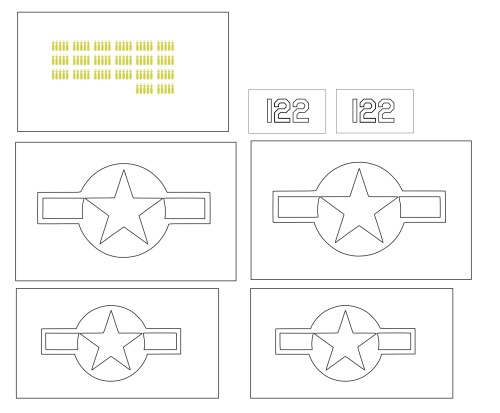 1_48_F4U_Corsair_white_122.svg not sure if the bomb markings are realisable for non-laser cutters, as the laser removes the "filling" of the bombs. For better handling, the overall size is slightly larger than the decal. (abou 2,5 mm higher than the decal) photos of the result will follow
-
View File F4U_corsair_white_122_48scale.lbrn2 F4U_corsair_white_122_48scale.lbrn2 not sure if the bomb markings are realisable for non-laser cutters, as the laser removes the "filling" of the bombs. For better handling, the overall size is slightly larger than the decal. (abou 2,5 mm higher than the decal) photos of the result will follow Submitter MiloMinder Submitted 07/14/2024 Category Specific Aircraft
-
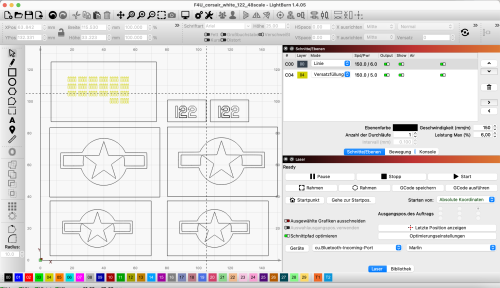 F4U_corsair_white_122_48scale.lbrn2 not sure if the bomb markings are realisable for non-laser cutters, as the laser removes the "filling" of the bombs. For better handling, the overall size is slightly larger than the decal. (abou 2,5 mm higher than the decal) photos of the result will follow
-
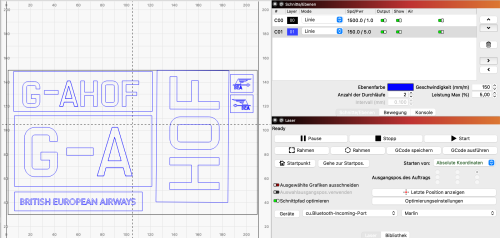
View File 1_48_BAE_JU52.lbrn2 1_48_BAE_JU52.lbrn2 Submitter MiloMinder Submitted 07/14/2024 Category Aircraft - Civil
-
-
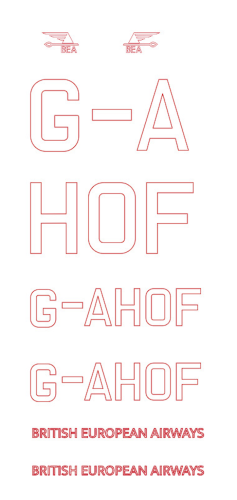
View File 1_48_JU52_BAE_G-AHOF.svg 1_48_JU52_BAE_G-AHOF.svg Submitter MiloMinder Submitted 07/14/2024 Category Aircraft - Civil
-
-
-
View File Miss_Virginia_48scale.lbrn2 Original Lightburn-File --> Ready to burn! Just ignore the wavy outline of the "Miss Virginia"-Lettering, it comes out just fine, because of the small size. Submitter MiloMinder Submitted 10/01/2023 Category Specific Aircraft
-
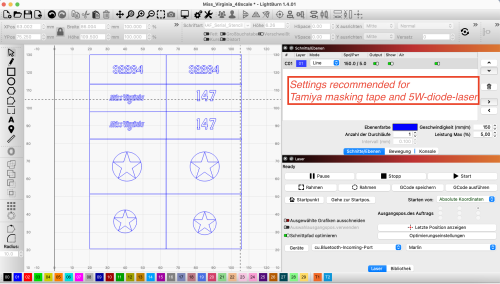 Original Lightburn-File --> Ready to burn! Just ignore the wavy outline of the "Miss Virginia"-Lettering, it comes out just fine, because of the small size.
-
View File P-38_Miss_Virginia.svg Exportet as .svg from Lightburn. I hope it´s usable for maybe other machines like plotters. Just ignore the wavy outline of the "Miss Virginia"-Lettering, it comes out just fine, because of the small size. Submitter MiloMinder Submitted 10/01/2023 Category Specific Aircraft
-
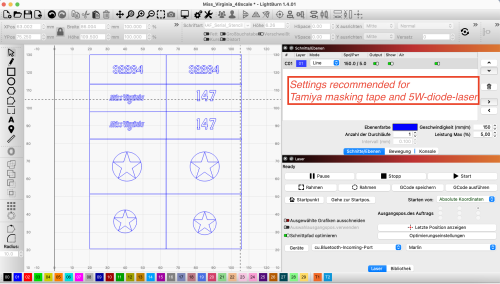 Exportet as .svg from Lightburn. I hope it´s usable for maybe other machines like plotters. Just ignore the wavy outline of the "Miss Virginia"-Lettering, it comes out just fine, because of the small size.
-
View File p-38_miss_virginia.dxf Exportet as .dxf from Lightburn. I hope it´s usable for maybe other machines like plotters. Just ignore the wavy outline of the "Miss Virginia"-Lettering, it comes out just fine, because of the small size. Submitter MiloMinder Submitted 10/01/2023 Category Specific Aircraft
-
 Exportet as .dxf from Lightburn. I hope it´s usable for maybe other machines like plotters. Just ignore the wavy outline of the "Miss Virginia"-Lettering, it comes out just fine, because of the small size.
-
Thank you, Kev! I will describe my workflow in the tutorial-section, as soon as i get some good results. I´m glad that you are interested!
-
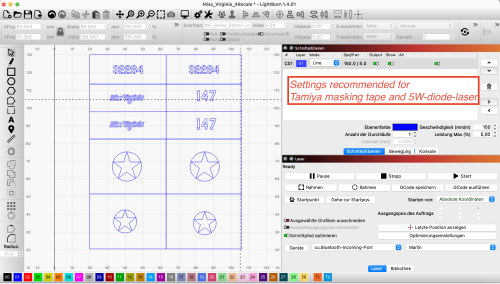
Hi, folks! I´m sure that those cricut-machines etc. are the most comfortable way to do some masking. But in my case, i had already purchased a laser-module for my 3D-Printer because of other applications. So i wanted to figure out, if it is also useful for making some 1/48 masks. So if someone else here is interested in laser cutting: i can recommend the following settings for a 5W-Diode-Laser in combination with Lightburn and Tamiya masking paper: 150mm/min and 5% Power. If some of you guys already did some laser cutting, i would be happy to hear about your experience with different materials/parameters. Currently i am building the Tamiya P-38 (what a gem of a kit!). I think in 48-scale it looks better to use the provided decals for everything besides the larger insignia. I have tried to make a mask for the "Miss Virginia"-Lettering, but i think it´s just too small to handle and align the letters. Nevertheless interesting to see how accurate this setting performs.
-
Hello everyone, thank you for accepting me. I have paused scale modelling for a few years and now i am back into it. My focus is on WWII-era Aircraft from the pacific theatre, vietnam-era Jets and early helicopters. Mainly in 48scale. A few month ago i started 3d-printing and i have also purchased a laser-module for my Ender 3 S1. Now i want to laser cut some of your masking templates with it. Currently i am working on the Tamiya P-38 "Miss Virginia". If i manage to make some usable masks for the Nose-Art and maybe other markings, i will upload the files. In the past, my father did some Decal templates and had them printed by the druckeronkel.de Maybe i try to convert some of those to masking-templates and share with you guys. Again: thanks for accepting me and providing me with this great stuff for my "second modeling phase of life"! Cheers Rick alias MiloMinder