


craig b
-
Posts
8 -
Joined
-
Last visited
-
Days Won
3
Content Type
Profiles
Forums
Events
Downloads
Files posted by craig b
-
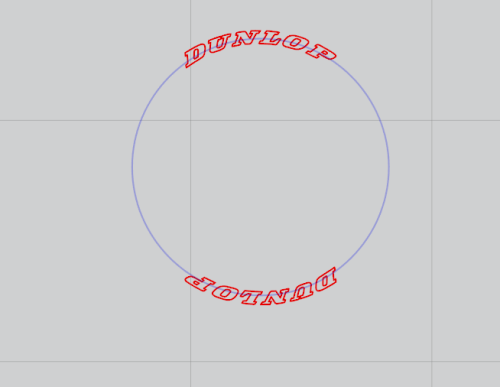
DUNLOP tires
By craig b in Vehicles - Civil
Here are markings for adding DUNLOP to road racing car tires. The blue circle will help estimate the size of stencil for a particular kit and can be either deleted or selected as a non-cut before cutting. Use a non-solvent paint if painting rubber tires, as solvent paints will soften the rubber. Dunlop racing tires, or tyres for my UK audience, also had a small logo ahead of the D but this is too small for a stencil. Different racing series used different tire brands and sometimes would change from one season to the next. Per usual, check references or just go for it and use them anyway.
1 download
(0 reviews)0 comments
Submitted
-
.thumb.jpg.b738d7d530153df9ce00fa621acf3b05.jpg)
Airfix Me 410A-1/U2 & U4 kit #A04066
By craig b in Canopy Masks
Canopy masking for the two versions of the Me 410 by Airfix. Extra clear parts are on the clear parts tree but not designated in the instructions.
Feedback always appreciated.
Craig
4 downloads
(0 reviews)0 comments
Submitted
-
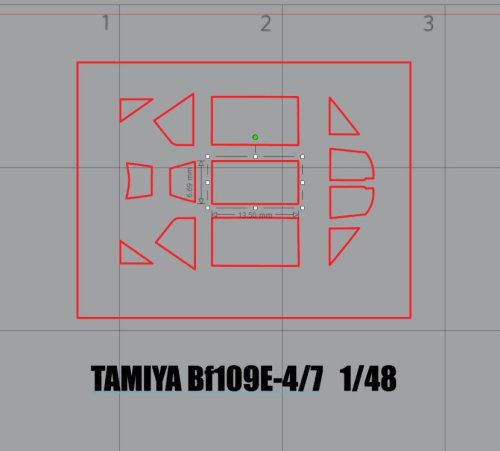
Tamiya Bf109 E-4/7 canopy 1/48
By craig b in Canopy Masks
Canopy masks for Tamiya Bf109 E-4/7, kit #61063. Appreciate any feedback.
8 downloads
(0 reviews)0 comments
Submitted