

Red Dog
-
Posts
8 -
Joined
-
Last visited
-
Days Won
3
-
Warm air can be 5° if the air it replaces is -12°C 🙂 You are right that the details might be better but that's mostly due to my lack of experience working with the cameo. If the engraved rivets would clear a bit more the cut lines the parts would be way better Still the stuff it replaces is really bad so I can live with 5° good 🙂 I often cut 0.3mm styrene sheet with the cameo. It's probably extra wear on the blade but I actually never go through on purpose. I finish the cut by sanding from the rear face which provides the benefit to thin even more the styrene. Apologies if the file is misplaced. Feel free to move it around as I thought there was one unique download section.
-
Perfect, got it printed Gene. I knew about the colours already, the line thickness setting escaped me. I guess I'm too used to WYSIWYG 🙂
-
Version 1.0.0
5 downloads
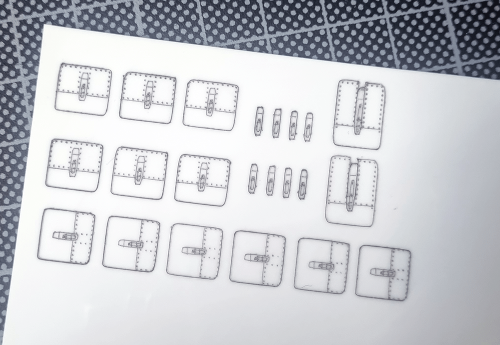
Here is a studio file to replace A-10 engine latches. It's not meant to cut as masks but to cut material. Scaled for 1/32 - meant to be used with 0.3mm styrene sheet Red for engraving, blue for cutting. -
View File 1/32 A-10C engine latches Here is a studio file to replace A-10 engine latches. It's not meant to cut as masks but to cut material. Scaled for 1/32 - meant to be used with 0.3mm styrene sheet Red for engraving, blue for cutting. Ignore the green layer Submitter Red Dog Submitted 03/29/2023 Category Specific Aircraft
-
Thank you Gene, I'll try that right away. Much appreciated
-
Thank you gents
-
Have a silhouette Cameo 4 and I cut masks for my models but my knowledge of the process is very limited. Looking forward to learn tips and tricks and get better with the software and cutting
-
Hello gents, I'm struggling with a basic function i can't get to work. Often i want to print my design files from the silhouette studio software before cutting. But when I print I always get a blank page no matter what's on the studio file. I must be missing something stupid? Thanks