Mozart
SMPM_Members
-
Joined
-
Last visited
Everything posted by Mozart
-
Gloster Gladiator 56 Squadron View File Masks for ICM's 1/32 Gladiator as flown by 56 Squadron (possibly with chequerboard or not!) Submitter Mozart Submitted 07/26/2020 Category Specific Aircraft
-
Silver Wings 1/32 scale Stieglitz, home-produced masks to replicate the trainer flown by Peter Spoden: Max
-
KH North American T-6 1/32 scale finished as Harvard III. All markings, canopy masks and walkways via Silhouette Cameo 2 + Designer edition software. The (inner) middle canopy section was also cut with the cameo from ten thou plastic card. Max
-
One of the skills, perhaps considerations might be a more accurate word that I’ve learned over the years that I’ve been using my cutter, is how to efficiently draw the designs. My favourite “buttons” on the top tool bar are “copy” (Ctrl +C), “paste” (Ctrl +V), “Object” - the drop down menu enables a mirror or flip function, and “Group/Ungroup” (Ctrl+Shift) which enables you to select drawn lines/shapes and group them as one entity. Being familiar with these few keys gives you the ability to be able to draw shapes quickly and accurately and to make the best use of the design software. I am by no means whatsoever claiming to be an expert with these things, more a functional user using what I have found works for me and if I can pass on a few of these tips then I’ll be happy! I love the challenge of having a new set of masks to draw then planning how to go about it. I spent an hour or so yesterday drawing some masks for my Lightning so I’ll add to this thread a little later with some pointers about how I did them. Watch this space......😀 Max
-
NA Harvard IIa S Rhodesia 1943/4 View File A couple of examples of numbers, serials and roundels found on RAF Harvard IIs at the Service Flying Training Schools in S Rhodesia. Submitter Mozart Submitted 07/26/2020 Category Specific Aircraft
-
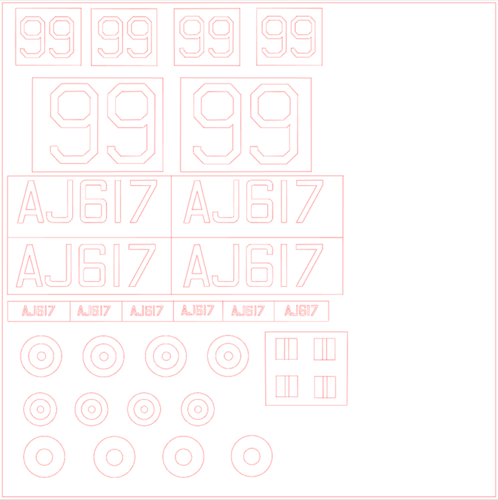 A couple of examples of numbers, serials and roundels found on RAF Harvard IIs at the Service Flying Training Schools in S Rhodesia.
-
Silhouette is the market leader and I believe offers the most flexibility and range. Another popular brand is Cricut; I have no personal experience with these but users on the Facebook group about mask cutting give the impression that they are not as well suited to the tasks that we as modellers require. Max
-
Good to see you here Mike, everything that Brian has said is 100% true!
-
That works Kev, I had wondered about that too! Well done Brian. 😄 Max
-
Something I've I've always had to research is the way in which national marking evolve, the roundel and German crosses for instance. I know Thomas has uploaded some very useful masks for different categories of roundels, and very useful they are too but it would be good to cross reference this to photographs for positions, dates, dimensions and critically colours linked if possible to the range offered by companies such as MRP, Tamiya, Vallejo etc. I'm struggling at the moment to tie down a good Cold War colour range for my Echelon Lightning for instance.
-
What are the differences or advantages of Artool over Oramask 810 (my usual choice) Mal?
-
I’m a Silhouette Cameo 2 + Designer Edition user. I draw all of my masks just using the inbuilt software so I haven’t explored any other types yet. I love the potential that cutting my own masks gives me to be able to build the individual aircraft that I so often need, allied to the fact that I’m useless at applying decals! Looking forward to seeing your new venture develop Kev, good on you! Max